

Start with warm keys
Piano, electric piano, guitar, and soft pads create different foundations. Choose the sound you want nearest the listener, then describe the supporting parts. Subtle texture can feel warm without covering the melody in noise.

The AI Lofi Music Generator starts with what you are doing. A quiet work session, an evening at home, and a narrated video call for different levels of movement.
Choose Study & focus with Piano lo-fi for a steady arrangement, soft drums, and modest variation. Lamplit Pages uses this direction; its two real instrumental versions run 2:36 and 2:42.

You do not need a production setup to give the AI Lofi Music Generator a useful brief. Start with a setting, choose a direction, and react to the actual music.
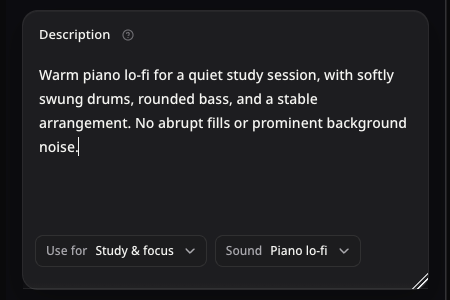
Say what the music is for, the feeling you want, and one or two sounds. For example: “Warm piano lo-fi for a quiet desk after dark, with soft swung drums and a stable arrangement.” Add what the music needs to leave room for, such as reading or narration. A starting idea can fill the form without submitting a generation. Keep the most important instruction near the beginning. Use your own scene instead of a long list of unrelated genres.
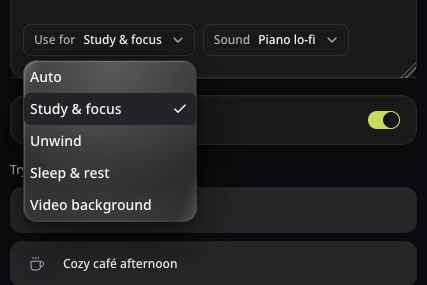
Use for guides the arrangement: Study & focus suggests continuity, while Video background leaves space for a story. Sound guides the texture, such as Piano lo-fi, Jazzy lo-fi, or Ambient. Auto follows your description. Instrumental is on by default in the AI Lofi Music Generator. Switch it off only when you want singing, then optionally add your own Lyrics. Choose environmental sound deliberately; rain and vinyl noise are not required. You can close Lyrics or switch Instrumental without losing the draft held in the current form.
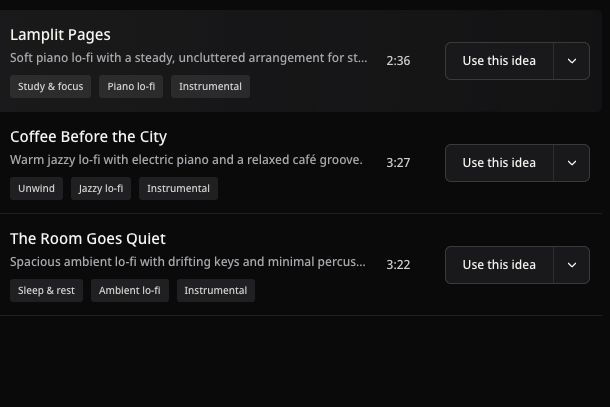
Check the AI Lofi Music Generator’s displayed credit cost, generate, and compare the returned versions. Listen for prominent melodies, sudden changes, and the feel of the ending. Test the track in its intended setting before choosing it. The three real examples above are available as starting points; using an example fills the form so you can review its direction before spending credits. Favorite the version you want to find again in its Project. Change one direction at a time if you want to hear what made the difference.
Give the AI Lofi Music Generator a small set of connected cues. Warmth, rhythm, background sound, and endings do different jobs in the brief.
Piano, electric piano, guitar, and soft pads create different foundations. Choose the sound you want nearest the listener, then describe the supporting parts. Subtle texture can feel warm without covering the melody in noise.
Describe light swing, restrained percussion, or very little drumming. The AI Lofi Music Generator can follow a sparse direction, but the result still needs a listening pass for fills or accents that stand out.

Rain, room sound, and surface noise are creative choices. Mention them when they help the scene, or ask for a cleaner texture. A café-inspired groove can use warm chords and brushed drums without audible chatter.
Ask the AI Lofi Music Generator for a soft finish or a gradual reduction in energy. Then hear how the actual version resolves. If you need a repeat, check the join in your editor; a request for continuity is not a precise loop control.
Use the AI Lofi Music Generator to find a direction, then choose a practical next step. Keep useful settings when you want another interpretation.
Hear a full work passage, place the track under narration, or listen through the final transition. Save the version that supports your particular project.
Continuation actions apply to a selected generated song; tool links open a separate task.Return to the form and change one sound or use. Keep the useful parts of your description so you can compare the result.
Open Music Extender when a track needs more material. Choose the source and hear the transition; exact duration and seamless joins need review.
Review available MP3 or WAV actions and commercial eligibility for your track before adding it to a finished video or project.
Practical answers about study beats, background music, lyrics, credits, and using a finished track.
The AISongsMaker AI Lofi Music Generator creates original lo-fi music from a description. Choose a use and sound, then compare versions. Instrumental is on by default; switch it off for singing and optional lyrics. The public piano, jazz, and ambient examples are real product outputs with their original prompts and durations.
Yes, signup credits let you try the core creation task. New accounts receive 30 credits, valid for 30 days. A standard generation costs 12 credits, with the amount displayed before submission. Sign in to use your balance. The public examples can be heard without generating. Download access and commercial rights are separate from free creation credits, so review the current plans for your intended use.
See plans and creditsIn the AI Lofi Music Generator, choose Study & focus and describe the movement you prefer. Try warm piano, rounded bass, and modest variation. Lamplit Pages has two real instrumental versions using this direction. Hear the music during your own work; the style does not establish improved concentration.
Yes. Choose Video background and describe the scene, pacing, and room needed for voiceover. Keep Instrumental on when vocals would compete with narration. Hear the track under your edit. Before publishing or monetizing, check commercial-use eligibility and source rights. Platform acceptance and exact timing still need your review.
Read commercial-use termsYes. In the AI Lofi Music Generator, Sound includes Piano lo-fi, Jazzy lo-fi, Guitar lo-fi, Ambient, and other options. Use for separately guides the arrangement; Auto follows your description. Coffee Before the City uses Unwind with jazz, while The Room Goes Quiet uses Sleep & rest with ambient texture. Compare the returned music to choose your version.
No. Lo-fi can suggest warmth, relaxed rhythm, and a softer texture without conspicuous background sound. Describe rain or surface noise only when you want it. For a cleaner direction, ask for subtle tape warmth and no prominent environmental sounds. Warm chords and brushed drums can suggest a café without conversation.
Yes. Switch Instrumental off to request singing. Leave Lyrics empty for words based on your idea, or expand it and supply words you own or have permission to use. Describe sound and delivery separately. Switching Instrumental back on excludes the lyrics from that request while retaining the draft in the current form. Check the sung phrasing in the result.
Explore Lyrics to SongYou can describe continuity and a quiet ending, but this form has no exact-duration, hour-long, or seamless-loop control. The AI Lofi Music Generator creates a musical interpretation of your brief. To repeat a track, inspect the join in your editor. For more material, explore a selected song’s continuation actions or Music Extender, then hear the transition rather than assuming the start and end will match.
Explore Music ExtenderDownloads require qualifying access; MP3 and WAV availability follow the account and song assets. Qualifying paid access grants commercial rights to eligible generated songs under our Terms, including eligible songs previously made on Free. Rights for songs created before subscription expiry remain afterward. You still need rights in supplied material. Commercial permission is separate from copyright registration or freedom from platform claims; there is no blanket copyright-free guarantee.
Review terms and eligibility
YOUR NEXT SONG STARTS HERE
Start in our Free AI Song Maker with a prompt, your lyrics or audio of your own. Use your free credits to get versions from the AI Music Generator, then compare, choose and keep building.Start with a prompt, your lyrics or your own audio. Turn your idea into a song with free credits.
