AISongsMaker
GO PROMore credits · Commercial useAccess

Main

Create MusicLibrary

Create & Transform

Text to SongLyrics to SongAI Lyrics GeneratorAI Music ExtenderAI Song CoverAdd VocalsAdd Instrumental

Audio Tools

Vocal RemoverStem Splitter
PricingHelp & Feedback
HomeLibraryPricingCreatorCProfile
AISongsMakerCreate. Shape. Continue.support@aisongsmaker.org

Create

  • AI Music Creator
  • AI Song Maker
  • Lyrics to Song
  • Text to Song

Music Tools

  • AI Lyrics Generator
  • AI Song Cover
  • AI Music Extender
  • Stem Splitter
  • Vocal Remover

Resources

  • Pricing
  • FAQ
© 2026 AISongsMaker. All rights reserved.
Privacy PolicyTerms of ServiceRefund Policy
AISongsMaker

FEATURES

Three ways to start your next song

An AI Music Creator for ideas, original lyrics, and audio you own. Choose the starting point that carries your idea, then shape the music around it.

IDEA

Give an idea a sound

Describe a scene, feeling, or story in everyday language. The AI Music Creator turns that brief into music you can hear and develop. Start small, then use your first listen to sharpen the direction.

  • Name the mood and the change you want in the chorus.
  • Choose vocals or an instrumental for the job in front of you.
  • Try another direction without losing the idea that started it.

Create a song
Pencil and paper in a tactile songwriting composition
LYRICS

Hear your words as a song

Bring a verse, a hook, or a complete lyric. Keep the words in the Lyrics field and use Style to guide the performance. Hear how melody, pacing, and arrangement carry the message you wrote.

  • Use section labels to make verses and choruses easy to follow.
  • Explore how the same words feel in another musical direction.
  • Keep a separate copy of writing that you have not submitted.
Create a song
Singer performing close to a microphone
OWN AUDIO

Build from audio you own

Start with a demo, voice memo, or an earlier track. Choose Cover to explore a new performance or Extend to continue a selected source. Your recording gives the next musical decision a concrete starting point.

  • Select a compatible source from your Library or an upload.
  • Use recordings you own or have permission to transform.
  • Review the selected action and credit cost before submitting.
Create a song
Recording equipment in an editorial still life

HOW TO

How to use the AI Music Creator

Three focused steps take you from a first idea to a listening decision. The workbench above keeps the input, direction, and returned tracks together.

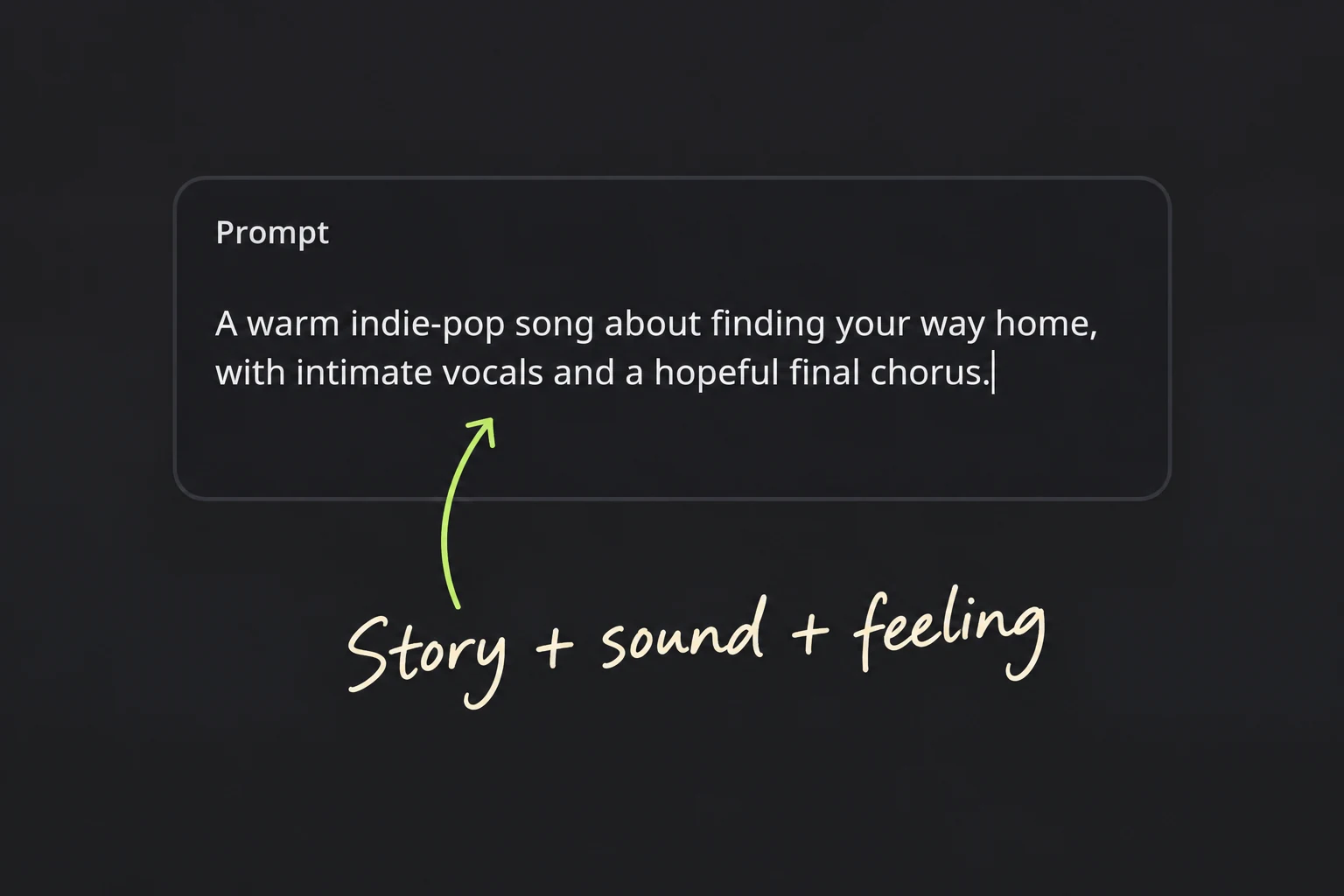
  1. Real Prompt field with a story, sound and feeling annotation
    Real Prompt field with an original example; nothing submitted.

    01Describe your song

    Give the AI Music Creator a subject, mood, and sound. Try “warm indie-pop about finding your way home, intimate vocals, hopeful chorus.” One clear idea gives you something specific to listen for.

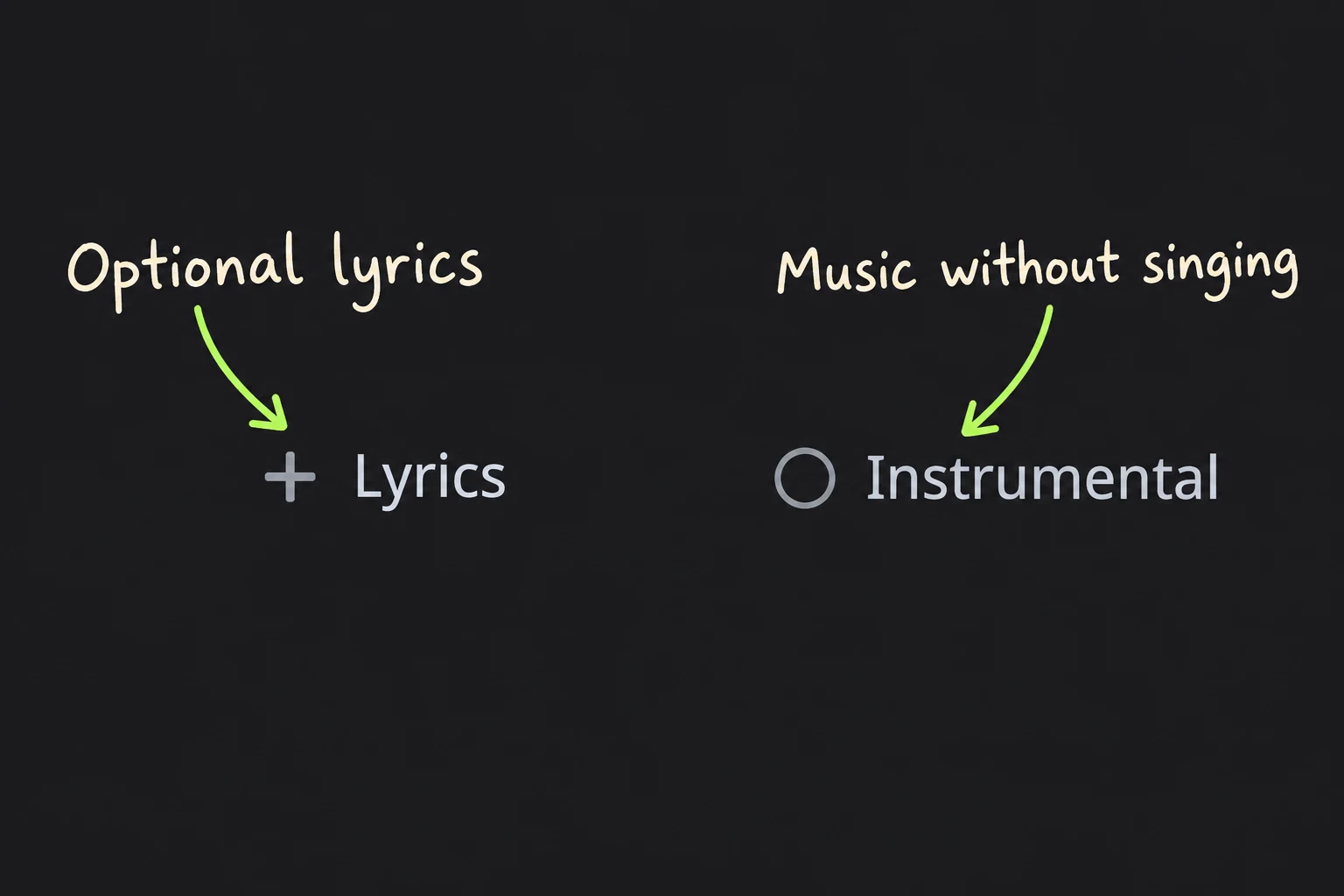
  2. Real Lyrics and Instrumental controls with annotations
    Real Lyrics and Instrumental controls, with tutorial annotations.

    02Choose the direction

    Add original lyrics when the wording matters, or choose Instrumental when you want music without singing. Use style cues to guide the sound. Check the displayed credit cost, then generate when the brief feels ready.

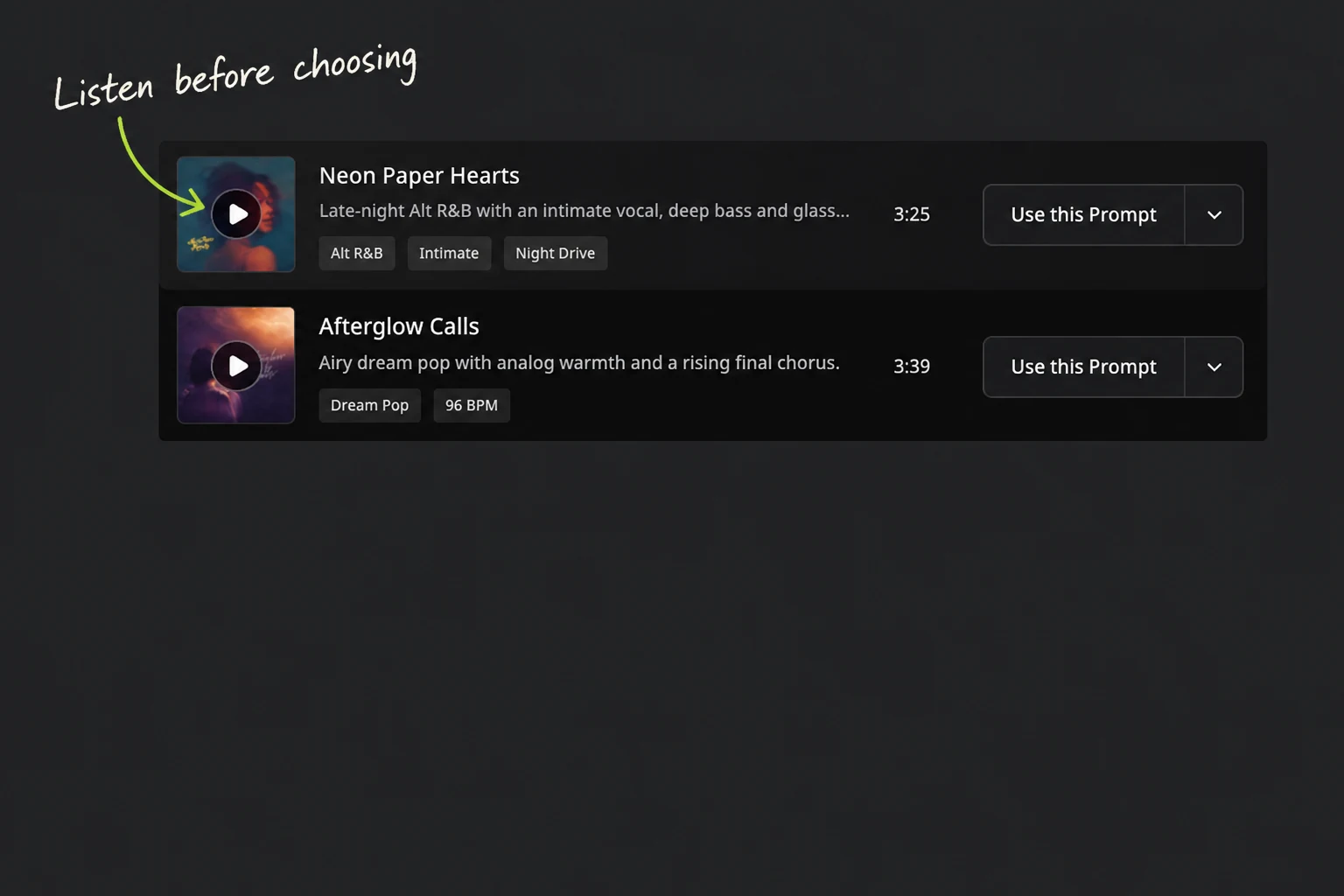
  3. Public example tracks with a listening annotation
    Public song examples illustrate listening; these are not private results.

    03Listen and choose

    Listen to the returned versions through the chorus and ending. Compare the voice, hook, and pacing against your brief. Favorite the one worth revisiting, then return to its Project for your next change.

WHY CHOOSE

Why create with AISongsMaker?

A useful AI Music Creator makes creative decisions easier. AISongsMaker combines a clear first step with a place to compare, keep, and continue your songs.

One music scene in three print treatments; a conceptual illustration of choosing a direction
01 / LISTEN & CHOOSE

Your taste leads the next version

A first result gives you something concrete to judge. Listen for the moment that works, then change one meaningful dimension: a softer voice, a stronger chorus, or a different feel. Your reaction becomes the next brief.

Compare the song against your purpose, rather than its cover image.Keep a preferred version while you explore a fresh direction.Use the AI Music Creator to develop an idea through listening.
Screenprint drummer expressing continued creative momentum
02 / KEEP & CONTINUE

A workspace you can return to

Projects keep submitted songs together; Favorites mark the tracks you want to find again. Return to a selected version and choose a relevant continuation. The creative loop stays connected as your idea becomes more specific.

Move from a selected track to available follow-up actions.Review each new result before choosing the version to keep.Export supported assets when the track fits your next use.
Create a song

USE CASES

Make music for the thing you are creating

Use an AI Music Creator for a personal song, a video, or a thoughtful gift. Start from the listener and the moment, then write a brief that fits.

01 / Videos

A song for a story or video

Give a travel film, short scene, or recurring series a musical direction. Describe the scene and its emotional movement, then test the song against the edit. An instrumental can leave room for dialogue; a vocal hook can carry a montage.

  • Match the energy to the scene, rather than adding every style you like.
  • Listen to the beginning and ending where your edit needs them.
  • Check the current usage terms before publishing or client delivery.
Create a song
Filmmaker with a handheld camera on a coastal overlook
02 / Personal songs

A personal song worth finishing

Turn a memory, a line in your notes, or an unfinished chorus into something you can play. The AI Music Creator helps you hear possible directions before you decide which one belongs to the song. Keep the details that make the story yours.

  • Include a place, image, or original phrase that matters to you.
  • Use your own lyrics when the exact words carry the meaning.
  • Revisit the preferred track in its Project when you want to continue.
Create a song
Hands playing an upright piano in daylight
03 / Gifts

A musical gift with a personal detail

Make a birthday song, a thank-you, or a small celebration around a shared memory. Write who the song is for and what you want them to feel. A specific story gives the gift more character than a generic greeting.

  • Build the chorus around a detail the listener will recognize.
  • Choose a mood that suits the person and the occasion.
  • Preview the full song before choosing an available download.
Create a song
Painted envelope, ribbon and gift parcel

NEXT STEPS

Keep creating from the version you like

The AI Music Creator is a starting point for a continuing song. Pick one next action that serves the track, and keep your preferred version within reach.

Your selected song is the starting point

Open the Project, listen again, and choose what the track needs: more time, another interpretation, or an export for your next creative task.

Follow-up actions show their own eligibility and credit cost.

Extend a section or ending

Continue a selected track when it needs more room. Give the extension a clear job, such as a final chorus or a gentler ending, then listen across the join.

Open Music Extender

Explore a different performance

Use a compatible source to try another musical interpretation. Keep the original available, and compare the new result with the part of the song you want to preserve.

Open AI Song Cover

Export the version you chose

Download a supported asset when the track is ready. MP3, WAV, and other options follow the current plan and eligibility shown in the product. Review usage rights before publishing.

Return to the workbench

FAQ

AI Music Creator questions, answered

Practical answers about starting, choosing, keeping, and using your songs.

An AI Music Creator turns a written idea, original lyrics, or compatible audio into music you can listen to and develop. AISongsMaker connects that first generation with Projects, Favorites, and available follow-up actions. You describe the direction, hear what came back, and decide what to keep.

Yes. Eligible new accounts can use sign-up credits for a core creation action. Sign in, check your available credits, and review the cost displayed before generating. Free access gives you a starting allowance to try the workflow; the current plan determines additional use and download options. Pricing shows the latest terms when you are ready to do more.

Give the AI Music Creator one clear subject, a mood, and a musical direction. “Reflective electronic pop for a late-night train ride, soft vocal, hopeful final chorus” is easier to judge than “make a good song.” Listen first, then change one important part of the brief.

Yes. Paste your original words into Lyrics and describe the performance in Style. A verse, chorus, or complete lyric can be a useful starting point. Use readable section labels and review how the generated melody phrases the words. Keep a separate copy of text you have not submitted; explicitly saved lyrics and submitted song tasks follow their own persistence rules.

Yes. Choose Instrumental when you want a track without singing, then describe its mood and purpose. The AI Music Creator can help you explore music for a scene, background, or personal listening idea. Listen through the complete result to check that the arrangement fits.

Yes, through a compatible audio-based action. Choose a source from Library or upload audio that you own or are authorized to use. Cover explores a new interpretation; Extend continues a selected source. Review the formats, duration, eligibility, and cost shown by the chosen action.

Listen for the voice, hook, pacing, and ending, then compare each version with the same brief. The AI Music Creator returns the tracks available for the selected action; use those results rather than expecting every action to return a fixed count.

Yes. Select a track and use the follow-up actions available for that result, such as extending it or exploring another interpretation. Each action has its own source requirements and credit cost. Preview the new result before choosing what to keep.

Keep your own copy before leaving the page. Text typed into an unsubmitted field should not be treated as a saved song. Submitted tasks and their returned tracks can belong to a Project, while explicit save actions handle reusable lyric material.

You can download assets available for your track and current plan. Commercial-use rights depend on the applicable plan and terms, so review them before publishing, monetizing, or delivering a song to a client. Check that you also have rights to the lyrics and audio you supplied. The product displays eligible formats, including MP3 or WAV where supported, at the download step.

Check the task status and any credit adjustment before retrying. Keep the task details if a result or charge looks wrong, and use support to resolve it. Once you know the task outcome, you can revise the brief or try again with a clear next decision.

Make a song you want to keep building.

Start with the AI Music Creator above. Bring an idea, your words, or eligible audio; hear the result; choose your favorite; and return when the next direction is clear. Your taste gives the song its purpose.

Create a song
AISongsMaker
…
Prompt
Suggestions
Selected and recommended styles

Free AI Music Creator for Ideas, Lyrics & Audio

Bring your idea, lyrics, or audio—or start with a curated example below.

Neon Paper Hearts

Late-night Alt R&B with an intimate vocal, deep bass and glassy synths.

Alt R&BIntimateNight Drive
3:25

Afterglow Calls

Airy dream pop with analog warmth and a rising final chorus.

Dream Pop96 BPM
3:39

Blue Wire

Minimal soul with a close vocal, brushed drums and electric piano.

Minimal SoulClose VocalPodcast
3:04

Paper Sky

Slow-building instrumental with ambient guitar and cinematic space.

InstrumentalSlow BuildVideo
2:20

Quiet Rooms

Tender lo-fi keys with tape texture and soft room tone.

Lo-fiTenderStudy
1:58

Open Road

Warm indie folk with driving rhythm and open-road energy.

Indie FolkWarmTravel
3:01

Birthday Spark

Bright celebration pop with a warm male lead and a sing-along birthday hook.

Celebration PopMale VocalBirthday
2:40

Run the City

Fast drum and bass with distorted guitar for sports and high-energy edits.

Drum & BassSportsInstrumental
2:31

Level Up Sunrise

Optimistic chiptune adventure with orchestral color and a heroic motif.

ChiptuneGameInstrumental
0:55

Launch Sequence

Crisp electro-funk with an elastic bass hook and clean reveal pauses.

Electro-FunkProductInstrumental
1:10

No Signal Needed

Alternative hip-hop with crisp diction, dry boom-bap drums and a grounded hook.

Alternative Hip-HopMale RapMotivation
1:58

Luz de Medianoche

Luminous Latin pop with warm bass, rhythmic guitar and a midnight dance hook.

Latin PopSpanishDance
3:00